
CorrLinks Text Chat
Advanced Technologies Group, LLCCommunication
3.3233.00 Reviews
- Version
- 3.8.2
- Installs
- 50.00K
- Age Rating
- Everyone
Screenshots
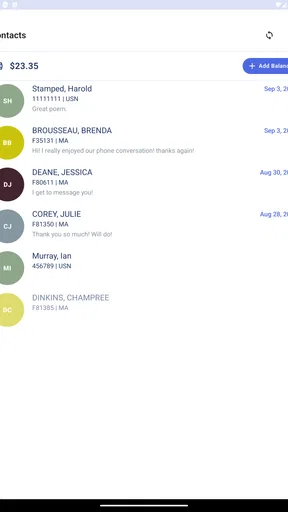
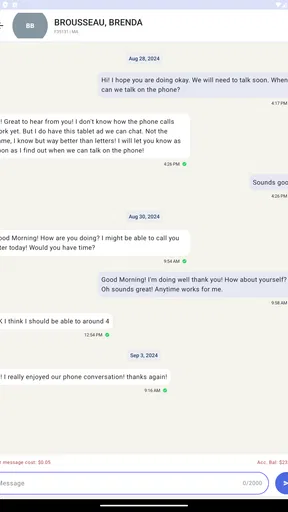
Our Review of CorrLinks Text Chat
 Analysis by Appyee
When someone I care about is incarcerated, ordinary messaging apps are not a substitute for a communication channel built around that situation. CorrLinks Text Chat is a communication app from Advanced Technologies Group, LLC, intended for staying in contact with incarcerated family and friends. I’d think of it less as a replacement for every way of keeping in touch and more as a focused tool for people who already need CorrLinks in their lives.
That focus shapes the whole experience: the value is not a long list of social features, but having a place to manage conversations with approved contacts and keep a connection going. It is free to install, rated for Everyone, and has reached over 10,000 installs. Its average rating is 2.7 from around 230 ratings, so I would go in with realistic expectations rather than assume every part of the experience will feel effortless.
When a message depends on the network
Chat is only useful when a message can get through, and this is where I would plan around the realities of connectivity. A weak Wi-Fi signal or unreliable mobile data can interrupt the process, while the facility’s communication procedures may also affect how quickly a message arrives. I would not treat “chat” as a promise that every exchange will feel like a live conversation.
A practical habit is to send anything important when you have a steady connection, then leave room for a delay instead of waiting for an immediate reply. For example, if I needed to coordinate a family update, I’d send the key details clearly in one message and avoid relying on a rapid back-and-forth to settle the plan. That approach is useful even when the network is behaving, because it makes the conversation less dependent on both people being available at exactly the same moment.
If a message seems slow, I would resist repeatedly sending the same text. That can create confusion later if more than one copy reaches the conversation. Check the connection first, give the exchange time, and then follow up with a brief clarification if it is still needed. The app is meant to support communication, but network quality and facility processes are part of the experience too.
Using it around a busy day
CorrLinks Text Chat makes the most sense for a person who wants a dedicated channel for conversations with an incarcerated loved one, rather than a general-purpose messenger for all their contacts. I can imagine checking it during a lunch break, replying when I have a quiet moment, and returning later to review the conversation history before responding. That history can help me keep names, plans, and details straight without relying on memory.
It is also worth thinking about the phone you use. The app is listed for Android and iOS, and the stated minimum operating-system version is 7.0. If your phone is older or you keep software updates delayed, check compatibility before making this your only way to communicate. The current version is 3.4, but I would still judge its day-to-day fit by how it works on my own device and connection rather than by the version number alone.
For someone who already has a CorrLinks account, the sign-in requirement is a small but important part of getting started. I would make sure I can access that account before relying on the app for a time-sensitive conversation. If you are helping a relative set it up, it may be kinder to walk through the account step first, then test the app together, instead of troubleshooting login details when an important message is waiting.
What to do when a chat stalls
When something goes wrong, I would separate three possible causes: the phone’s connection, access to the account, and delays related to the facility’s process. That is more useful than assuming the app itself is broken the moment a reply does not appear. I’d try a reliable network, confirm that I can sign in, and avoid making promises based on an instant response.
This is a particularly important distinction for urgent matters. I would not use a chat app as the only plan for an emergency or a situation that needs immediate confirmation. For routine news, encouragement, or a question that can wait, it may be a meaningful way to stay connected. For something that cannot wait, use an appropriate alternative channel rather than assuming a message will be seen at once.
One useful workflow is to keep messages focused: put the main question near the beginning, include the context the other person needs, and make the requested next step clear. That reduces the chance that a delayed, interrupted exchange leaves the point unclear. It also makes conversation history easier to scan when you return to it later.
Keeping mobile use deliberate
Because this is a mobile communication tool, I would check notifications and connection conditions as part of my routine, not assume that every message will demand immediate attention. If I’m in a place with poor reception, I can wait until I have a more dependable connection to write a longer message. For a quick update, I would keep it concise and save complicated topics for a moment when I can focus.
There is a trade-off between convenience and attention. Notifications can help me notice incoming messages, but I would not let them dictate my whole day or interpret a quiet period as a sign that something is wrong. A sensible routine—checking at a few natural points in the day—can make the app useful without turning every pause in connectivity into a source of worry.
For data-conscious use, I’d keep the app’s role clear: it is for this particular communication relationship, not a reason to leave mobile data running everywhere or to depend on it for unrelated conversations. I would use Wi-Fi when it is convenient and reliable, and switch to mobile data only when that makes sense for my situation. The important point is not to assume a specific data cost or consumption pattern, but to pay attention to my own plan and connection.
Getting Started with CorrLinks Text Chat
First things first, downloading the CorrLinks Text Chat app is a breeze. It's available on both Android and iOS platforms, and setting it up is pretty straightforward. Once you've got it installed, you can easily register using your email and create a secure password. Just a heads up, you'll need to have a CorrLinks account already set up to use the app.
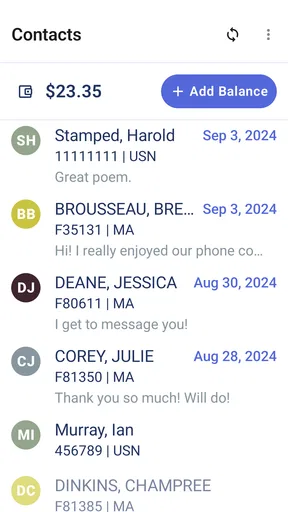
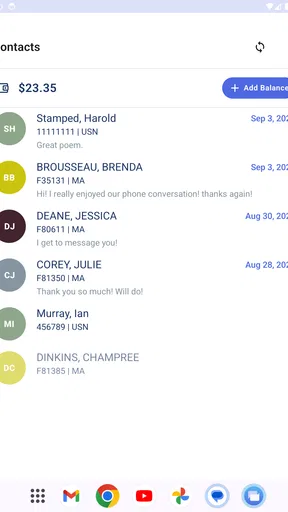
After logging in, the interface is clean and intuitive. It's not cluttered, which is a blessing if you're like me and get overwhelmed by too many options. The main screen gives you a direct overview of your active contacts and any new messages you might have received. It's basically like texting, but with a few extra steps for security.
The Features You’ll Love
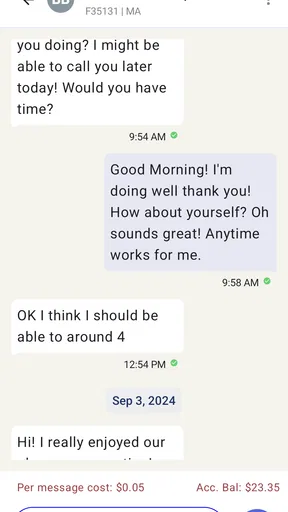
Now, let’s talk features. What makes CorrLinks stand out is its ability to provide real-time text chat. This is a game changer for anyone looking to maintain a connection with someone behind bars. The messages are delivered quickly, and the app sends notifications for new messages, so you won’t miss a beat.
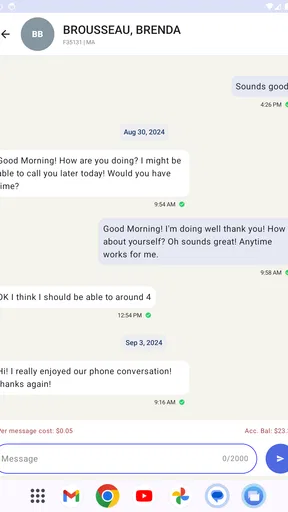
Another feature I found particularly useful is the contact management system. You can easily add and remove contacts, and there's a handy search function if your list starts to grow. Plus, the app provides you with a detailed history of your conversations, which you can access anytime.
The security features are also worth mentioning. The app employs encryption to ensure that all communications remain private and secure. It’s comforting to know that your conversations are protected, especially in a sensitive context like this.
Things to Keep in Mind
While the app is generally smooth sailing, there are a few things to be aware of. First, there's a cost associated with using the messaging service. It's not exorbitant, but it's something to consider if you're planning to use it frequently. You’ll need to purchase credits to send messages, which can add up over time.
Additionally, while the app does its best to mimic a real-time chat experience, there are still some delays due to the nature of the prison communication system. Messages might not always be instant, depending on the facility’s procedures.
Lastly, the app requires a stable internet connection. During my testing, I found that weak Wi-Fi or spotty mobile data could disrupt the messaging experience. Make sure you’re connected to a reliable network to avoid any hiccups.
Choosing the right channel
Compared with an ordinary texting app, this is a more specialized choice: everyday messengers are easier for general contacts, but they do not serve the same role for communication with an incarcerated person. CorrLinks is worth considering when that specific channel is available to you and your loved one. If you only need to message friends who can use standard services, I would stick with the familiar app rather than add another account and routine.
I would also avoid treating it as a complete substitute for every form of contact. A chat is useful for a short check-in, a supportive note, or a question that can be answered when the other person is able. It is less suitable for urgent coordination, emotionally complicated conversations that need an immediate response, or anything where a missed notification would cause a serious problem. Matching the channel to the stakes makes the experience less frustrating.
Small habits that make conversations easier
Contact management and conversation history are more useful when I use them deliberately. If several people are involved, I would keep the contact list tidy and check the recipient before sending something personal. Before replying to an older exchange, I’d scan the recent history so that I don’t answer a question that has already been resolved or lose track of a plan.
I would also make messages self-contained when possible. Instead of sending a string of fragments that depends on instant delivery, I’d include the relevant context and one clear question. That is a simple adjustment, but it helps when a reply is delayed and makes the conversation easier to revisit. For sensitive details, I would remember that encryption does not remove the need to use good judgment about what I choose to write.
People often want to know whether they can start immediately, whether it costs nothing, and whether a message is guaranteed to arrive at once. The account requirement means setup begins before the first chat; the app itself is free, while the earlier account of the messaging service describes paid credits, so I would check the current terms before budgeting for frequent use. And I would not count on instant delivery: network conditions and facility procedures can affect timing.
Who will get the most from it
I’d recommend considering the app if you already need a CorrLinks account and want a straightforward place to keep up with an incarcerated family member or friend. The Everyone content rating and uncomplicated communication focus make the intended use easy to understand, while the conversation history can be handy for relatives who share updates and need to remember what was discussed. It is especially fitting for patient, ongoing contact rather than constant rapid-fire texting.
I would hesitate if you need a guaranteed immediate channel, dislike managing a separate account, or mainly want a messenger for people outside this context. The average rating suggests a mixed experience among users, so I would install it with modest expectations and see whether it works reliably for my device, account, and circumstances. The app’s usefulness depends as much on that fit as on its interface.
Final Thoughts
All in all, CorrLinks Text Chat serves its purpose well. It's a vital tool for families and friends looking to stay connected with incarcerated loved ones. It's easy to use, secure, and provides that essential link to maintain relationships.
Sure, there are some costs involved, and it’s not without its minor issues, but the benefits of keeping in touch far outweigh these. If you find yourself in need of such a service, I’d recommend giving it a shot. It might just make the distance feel a little less daunting.
A realistic expectation to carry forward
My recommendation comes with one condition: treat the app as a useful connection point, not as a guarantee of uninterrupted conversation. I would use it for regular contact, keep messages clear, and have another appropriate way to handle anything urgent. If that matches what you need, its focused design is a reasonable place to start; if not, a different communication route may suit you better.
Verdict
Strengths of CorrLinks Text Chat
- Easy-to-use interface for seamless communication.
- Reliable real-time message delivery.
- Affordable subscription options available.
- Supports multiple device logins for convenience.
- Notifications ensure you never miss a message.
Limitations of CorrLinks Text Chat
- Limited customization options for chat themes.
- No support for video or voice calls.
- Requires internet connection at all times.
- Occasional lag in message synchronization.
- Limited to text-based communication only.
Other Releases by Advanced Technologies Group, LLC
View All
CorrLinks
Communication3.6
Similar Picks in This Category
View All
Google Messages
Google LLC4.6

Gmail
Google LLC4.1

Google Meet
Google LLC4.4

Google Chrome
Google LLC4.1

WhatsApp Messenger
WhatsApp LLC4.6

Carrier Services
Google LLC4.2
Frequently Asked Questions
What is CorrLinks Text Chat and who can use it?
CorrLinks Text Chat is a messaging application that facilitates communication between inmates and their friends or family members. It is primarily used in conjunction with the CorrLinks email service. To use this app, the inmate must be located in a facility that supports CorrLinks, and the outside user needs an approved account to communicate.
How do I set up and use CorrLinks Text Chat?
To set up CorrLinks Text Chat, you must first create an account on the CorrLinks website and be approved to communicate with an inmate. After approval, download the CorrLinks app from the Android or iOS store. Log in with your credentials and follow the prompts to connect with the inmate's account for text chat functionality.
Is CorrLinks Text Chat secure and private?
CorrLinks Text Chat provides a secure platform for communication, but users should be aware that all messages are monitored and recorded by the correctional facility. This means that privacy is limited, and inappropriate or unauthorized content can result in restrictions or account suspension. Always adhere to the facility’s communication guidelines.
Are there any costs associated with using CorrLinks Text Chat?
Yes, there are costs involved. While downloading the app is free, sending messages through CorrLinks may incur charges. The inmate typically pays for these services, but the outside user should check the specific facility's pricing structure. It's important to understand the costs beforehand to manage expenses effectively.
What should I do if I encounter technical issues with CorrLinks Text Chat?
If you experience technical issues with CorrLinks Text Chat, first ensure that your app is updated to the latest version. Check your internet connection and restart the app. If problems persist, visit the CorrLinks support page for troubleshooting tips or contact their customer service for further assistance. Be prepared to provide details about the issue for quicker resolution.
